
開新檔案 upload001.php, 儲存在 ref_test 資料夾。
<h1>單檔上傳</h1>
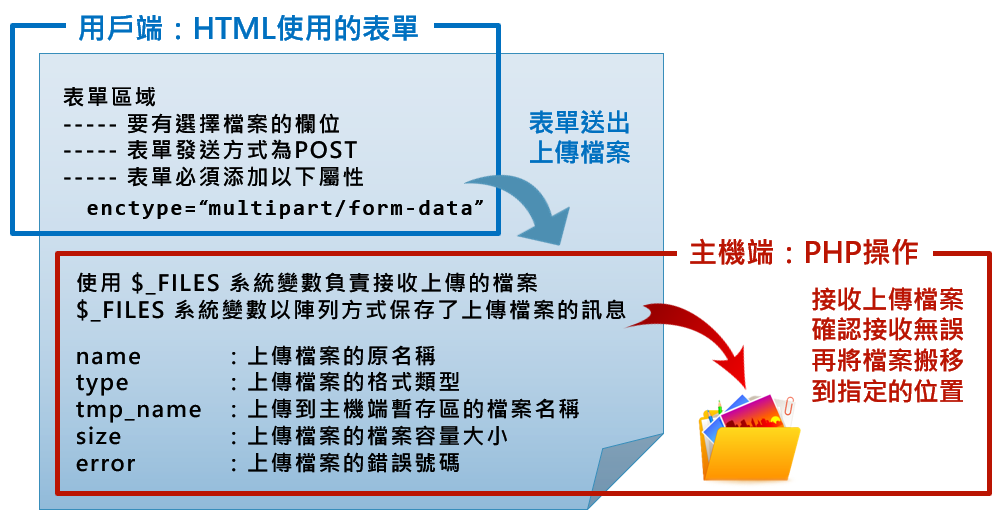
<form name="uploadForm" enctype="multipart/form-data" method="POST" action="">
  <input type="file" name="upload_file">
  <input type="submit" value="確定上傳">
</form>
<hr>
<?php
//假如有接收到上傳檔案,才執行以下工作======================================
//$_FILES: 接收上傳檔案的系統變數, 是一個陣列變數, 接收保存了上傳檔案的5個訊息
if (isset($_FILES['upload_file'])) {
  $file = $_FILES['upload_file'];
  //echo $file;    //=>array
  print_r($file);
}
?>
print_r($file);

//決定上傳檔案存放路徑=================
$path = './upload_file/';
//file_exists(指定資料夾或是指定檔案) 判斷指定的資料夾或檔案是否存在
//判斷指定資料夾是否存在
if (!file_exists($path)) {
  //如果不存在則建立出指定的資料夾
  mkdir($path);
}

//決定上傳檔案的檔案名稱===============
$filename = $file['name'];      //上傳檔案的原來檔案名稱

//當上傳成功沒有錯誤時, 將上傳暫存區的檔案搬移到指定的資料夾位置===========
if ($file['error'] == 0) {

  //搬移檔案 move_uploaded_file(要搬移的檔案, 目的地位置及目的檔案名稱)
  move_uploaded_file( $file['tmp_name'], $path . $filename );

  //假如指定搬移位置的上傳檔案已存在, 表示上傳成功, 接著 "練習" 拷貝、刪除
  if (file_exists($path.$filename)) {
    //決定第2個檔案存放路徑
    $path2 = './upload_file_2/';
    if (!file_exists($path2)) { mkdir($path2); }

    //拷貝檔案 copy(指定要搬移的檔案, 目的地位置及目的檔案名稱)
    copy($path.$filename, $path2.$filename);

    //測試拷貝成功之後, 再練習刪除檔案
    if (file_exists($path2.$filename)) {
      unlink($path2.$filename);
    }
  }
}
前往 localhost => 點選 PHP Information Version => 再運尋找功能search 「upload」
 WEB
WEB